Voxxy: Voice to Text from the macOS Menu Bar
A small, private, on-device voice-to-text app for macOS. Hold a hotkey, speak, release, paste. Here is why I built it and how it turned out.
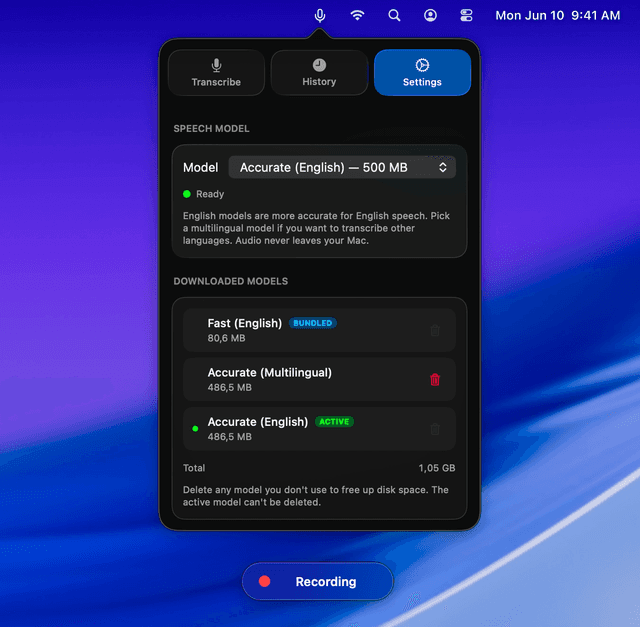
I just released Voxxy, a small macOS menu bar app that turns your voice into text and pastes it into any text field.
The idea is simple. You hold a hotkey, you speak, you release. Voxxy transcribes locally and pastes the result wherever your cursor is.
What it does
- Whisper-powered. It uses OpenAI's open-source Whisper model, running fully on-device via WhisperKit and Core ML. No API keys, no accounts, no cloud round-trip.
- Hold to record. Pick FN, Option, Command, Control, or Shift as your hotkey. Hold it anywhere on your Mac to record, release to stop and auto-paste.
- Auto-paste. The transcribed text lands in your clipboard and is pasted into the active text field automatically.
- 35+ languages. English, German, French, Spanish, Japanese, Chinese, Korean, and more.
- On-device. Your voice never leaves your Mac.
- Lightweight. Lives quietly in the menu bar. Install and talk.
Why I built it
This part is honest: it scratched my own itch.
I started using AI coding tools heavily, first Windsurf, then Cursor, and eventually settling on Claude Code. The more I used them, the more I realised how much time I was spending typing into input fields and TUI prompts. I wanted to talk to the agent, not peck at it.
So I tried the existing voice-to-text tools. VoiceInk and Wispr Flow are genuinely good. But they were not quite what I wanted. I was looking for something extremely snappy and minimal. AI-enhanced text rewriting was not important to me; raw, fast, accurate dictation was.
And, as always when I build something for myself, the other reason was: I wanted to learn.
I started Voxxy at the end of May / beginning of June 2025 and used it privately for a long time before shipping anything. It is built in Swift with SwiftUI. Roughly 5% of the code came from AI assistance, the rest is hand-written. No vibe-slope, just a small focused app.
I originally planned to open-source it, but decided against it in the end.
Why it is not on the Mac App Store
This one is annoying.
Voxxy is built around a global hotkey. You hold it anywhere on the system to start recording, release to paste. That is the whole interaction model.
Apple does not consider "press a hotkey, speak, see text appear in the focused field" an accessibility feature. Which means the entitlements that would make this work cleanly inside the sandbox are not available, and the App Store path is closed.
So Voxxy lives on voxxy.io and is distributed directly. That is fine. It actually keeps things simpler: I can ship updates when I want, and the app does not have to pretend to be something it is not.
What I learned building it
A few things stood out:
- Local Whisper is genuinely good now. WhisperKit + Core ML on Apple Silicon is fast enough that the latency between releasing the hotkey and seeing text appear is barely perceptible for short utterances.
- Privacy as a default is freeing. No backend, no auth, no analytics pipeline, no GDPR worries. The app does the thing, on your machine, and that is the whole story.
- Small apps still matter. Not everything has to be a platform. A single-purpose tool that does one thing well and stays out of your way is a perfectly good product.
I adapted the whole UI to the new Liquid Glass look in macOS 26 Tahoe. The menu bar popover, the settings window, the recording indicator, all of it.
Try it
If you spend your day talking to AI coding agents, writing messages, or filling in any text field, give it a try. The trial is 7 days, no account.